ErgoWattControl
🇬🇧 English · 🇩🇪 Deutsch
Windows app for indoor cycling on a Daum ergometer: ride GPX or FIT routes with gradient simulation, follow training programs (FTP ramp test, 4×4 intervals, sub-threshold, sprints …) or your own earlier rides, record every ride and export it as a FIT file to Garmin Connect, Strava, intervals.icu or TrainingPeaks. Free and open source (MIT).
Control for the Daum ergo_bike 8008 TRS via the serial port (RS232, 9600 8N1) – as a replacement for the cockpit control unit and the original software ergo_win 2003. The app speaks English and German (☰ → Settings → Language).
📖 Help / user guide · Hilfe (Deutsch) – with screenshots; in the app with F1.
⬇️ Download the latest version – Setup (installs the .NET 10 Desktop Runtime if needed, then the app for the signed-in user) or ZIP to unpack (needs the .NET 10 Desktop Runtime).
The modes
The screenshots show the app in German; in English the texts are in the same places.
| Free training | Riding a route (GPX or FIT) |
|---|---|
 |
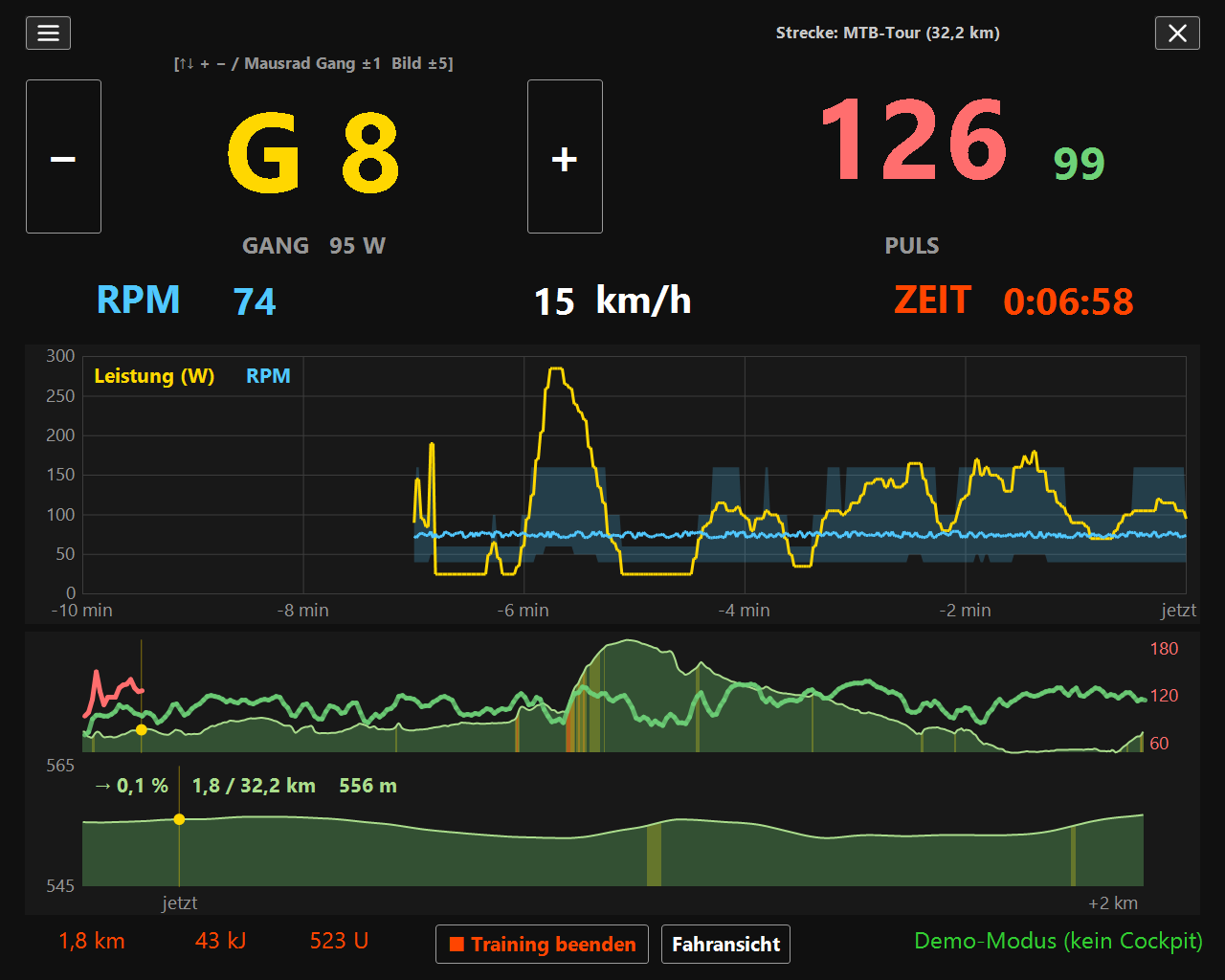 |
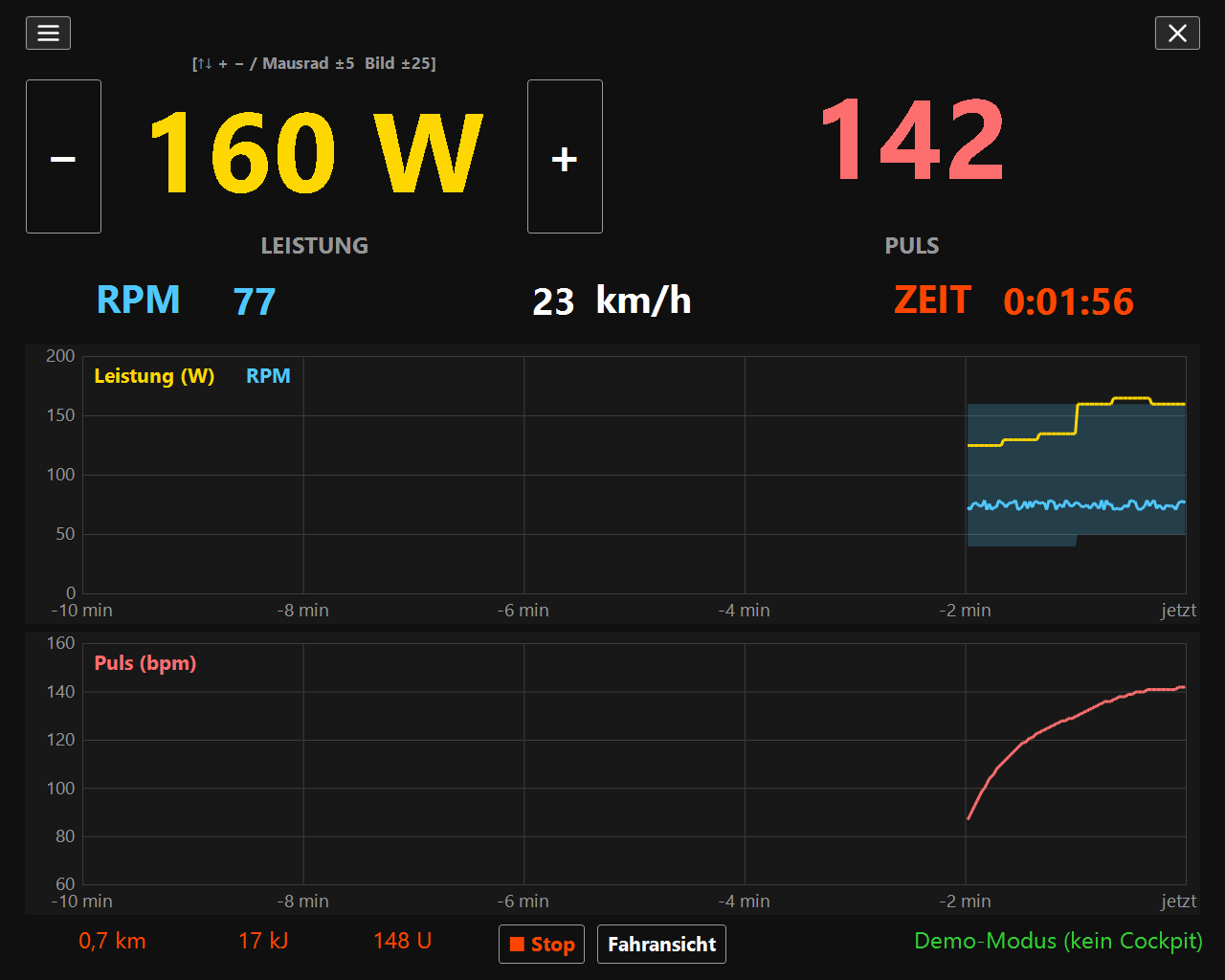
| Set the power in steps of 5 W; at the top power and cadence, below the pulse. | Gear instead of watts: the brake power follows from gradient, weight and speed. Here an own MTB tour as a FIT file: in the elevation profile the pulse back then (green) and today (red) by kilometre, the green number next to the pulse is the value back then at this point. |
| Training program | Replaying a recording |
 |
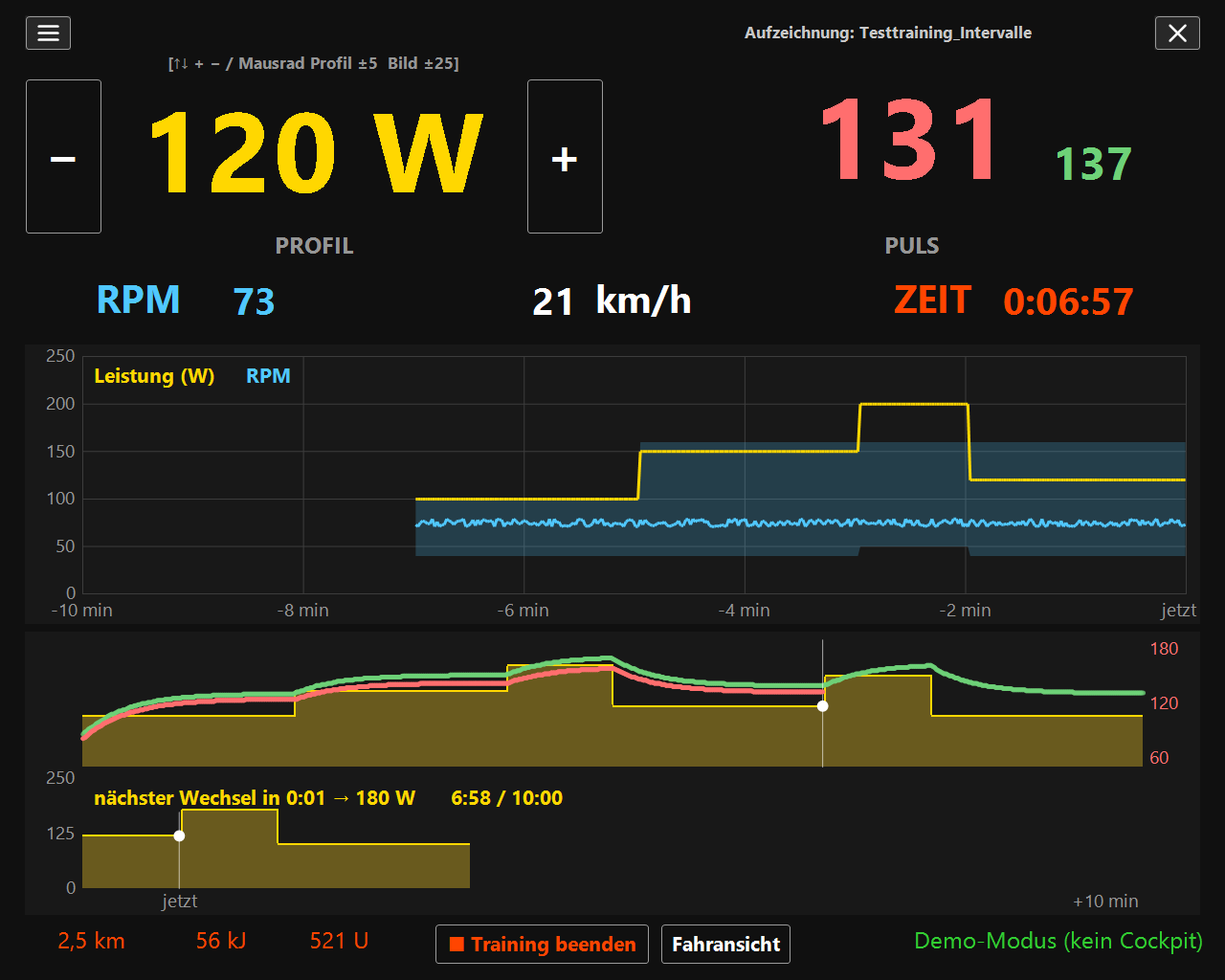 |
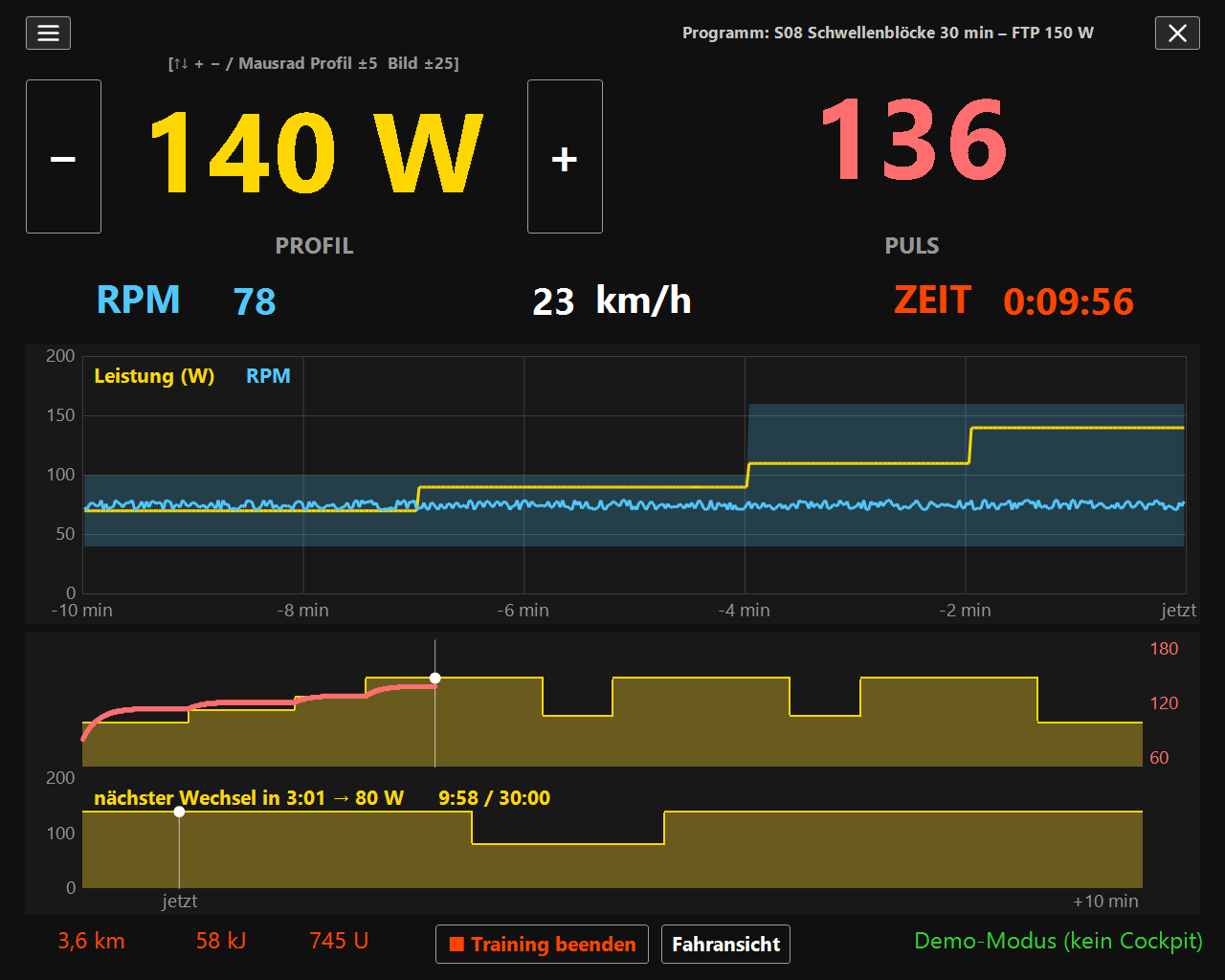
| The program sets the power. At the top the whole program with your pulse, below it the next 10 minutes with the next change. | An earlier ride as target: the pulse back then (green) next to today’s (red), as a curve and as a number next to the pulse display – so you see your progress. |
Features
- Free training: target power in steps of 5 W (keys ↑↓ + −, mouse wheel, PgUp/PgDn ±25 W), live data of power, RPM, pulse, speed, time
- Ride view for a small monitor on the bike (1280×1024): graphs for power/RPM and pulse, the permitted cadence range of the eddy-current brake as a band, arrows for pedalling faster/slower
- Recording as JSON: kind (training/route/program), the settings at the start, the target (route every 10 m with elevation and coordinates, or the power profile of the program/training) and one line of measured values per second. Keys and columns are English in every language. The file is written completely every 10 s, a crash costs at most these seconds. Recordings of version 1.x (German keys) and older CSV recordings can still be replayed.
- Export (☰ → Export recordings): FIT for Strava, Garmin Connect, intervals.icu, TrainingPeaks (routes as a virtual ride with positions, otherwise indoor training; Garmin FIT SDK) and CSV for Excel; with preview, delete and optional upload in built-in windows for Garmin Connect and Strava (sign in yourself, the app stores no password)
- Replaying recordings also from FIT files of other devices and apps: with power data as a power profile, otherwise as a route.
- Replaying a recording / starting a training program: the start dialogs show the settings that apply to the run, changeable for this run only (“Save as default” takes them into
settings.json). A route recording is ridden as a route again (stored route, simulated with the settings of the recording: weights, gearing, gradient factor, resistances, power limit). Programs and other recordings follow the power profile – only the power limit applies there. - Riding a route: ride a GPX route or a FIT file with GPS and elevation (e.g. your own tours from Garmin Connect), with the pulse back then (green) and today (red) by kilometre in the elevation profile; the brake power is calculated from gradient, weight and virtual speed (cadence × gear). Road bike or MTB gearing, adjustable gradient factor
- Automatic connecting and reconnecting after a cockpit reset; if the recordings folder can’t be written, the ride is still saved in a fallback folder
- Training programs (JSON with name, description and power profile, texts per language), ridden via “Start a training program”. They are embedded in the exe; at start the app writes missing or changed files to
Documents\ErgoWattControl\Programs(so changes there are overwritten, own programs with another name are kept). The selection dialog draws the power profile of the selected program and shows its description (details and sources inPrograms\README.md):P01–P44: the power-controlled fixed programs of the 8008 TRS from the manual (1–28, cool-down 42–44)S00–S08: programs based on current training science – ramp test to find the FTP, endurance base, 4×4, 4×8, 30/15, sub-threshold, 10×1 min, 3×20 s, threshold blocks 30 min, each for an FTP of 150/200/250 W- Custom programs: JSON files in the folder
CustomPrograms(Documents\ErgoWattControl or next to the exe), listed with ★ at the top; the format is described by the JSON schemaSchema/TrainingProgram.schema.json, templateExample_Custom_Program.json
- Help for riders in a window of its own (WebView2): F1 opens it at the section for the current view or open dialog, ☰ → Help at the beginning.
Help.de.html,Help.en.htmlandHelpPics\are embedded in the exe (the page in the language of the app); without the WebView2 runtime the help opens in the browser - Languages: English and German; “Automatic” follows Windows (English unless Windows is German). Numbers and dates follow the Windows settings.
- Demo mode without an ergometer: “Device: Demo” in the settings or
ErgoWattControl.exe --demo [route.gpx] - Start on the main screen instead of the rider’s monitor:
ErgoWattControl.exe -main(can be combined with-demo)
Structure of the source code
| Folder | Content |
|---|---|
Devices/ |
Device layer: IErgometer (interface of every ergometer: set the target power, measured values ErgometerData, status, capabilities), ErgoController (device-independent: target power, power limit, changing device), ErgometerTypes (list of device kinds) |
Devices/Daum/ |
Daum ergo_bike via RS232: protocol (DaumCockpit), connecting/reconnecting/reset (DaumErgometer), cadence range of the eddy-current brake |
Devices/Demo/ |
Simulated rider (DemoErgometer) |
Training/ |
TrainingController: the running training without a window – mode, recording, settings for this ride. The three modes FreeTraining, RouteTraining and ReplayTraining (recording or program) decide power, effect of the keys, recorded rows, file name and result |
RideView/ |
Ride view (RideForm, only displays and runs the dialogs), graphs, mouse wheel, summary, monitor selection |
Recording/ |
Recording (JsonRecorder, file format RecordingFile), export, upload, renaming/discarding |
Route/ |
GPX route, simulation (gears, gradient, power), elevation profile, route selection |
Replay/ |
Replaying a recording or starting a training program: reading, run, power profile, overview, program selection |
Localization/ |
Languages: Strings.resx (English, also for languages without a translation) and Strings.de.resx (German), accessed via L.T/L.F; Language sets the language from the setting at start; LocalizedText for texts per language in program files |
Settings/ |
settings.json (AppSettings) with the ride values as a group of their own (RideValues: weights, gearing, gradient factor, resistances, power limit – also changeable per ride in the start dialog), settings dialog |
Tests/ |
Unit tests (xUnit): contract tests for every device, ErgoController, cockpit protocol and connection against a simulated cockpit, training modes, settings.json, recordings, FIT/CSV export, programs, routes, texts in both languages and pseudo-localization |
Connecting other devices
The user interface only talks to ErgoController, which only talks to IErgometer. For a new device (e.g. a Bluetooth trainer with FTMS, ANT+ FE-C):
- Create a class in a folder of its own under
Devices/that implementsIErgometer: keep the connection alive in the background, applySetTargetPower, raiseDataReceived/StatusChangedand state inCapabilitieswhat the device can do (maximum power, power steps, possibly the cadence range of the brake). Values the device doesn’t measure (distance, energy …) staynull– the app then works them out itself. The contract every device must keep (onlyStartconnects, a target power also before connecting, no events afterDispose…) is described inIErgometer. - An entry
ErgometerTypeinErgometerTypes.All: id forsettings.json(never change it afterwards), name key inLocalization\Strings*.resx, creation, whether it is connected via a COM port and how “Test connection” works. The settings dialog follows it. - Add a subclass in
Tests/ErgometerContractTests.cs– ideally against a simulation of the protocol likeSimulatedCockpitfor Daum. Then the same contract tests run as for Daum and Demo. - Only if the device needs connection data other than a COM port (e.g. a Bluetooth address): add a field to
AppSettingsand a row to the settings dialog.
Building
.NET 10, Windows Forms:
dotnet publish ErgoWattControl.csproj -c Release -o publish
Tests (also run before every release on GitHub; a failure stops the release):
dotnet test Tests\ErgoWattControl.Tests.csproj
Pseudo-localization: the tests build every window with artificially altered texts (accents, about 40 % longer, between ⟦ ⟧) and check that no text is set past the resources, none is cut off in a fixed field and no dialog grows larger than the monitor at the ergometer (1280 × 1024). To look at it: write "Language": "pseudo" into settings.json.
They need no ergometer: SimulatedCockpit plays the Daum cockpit – with missing or out-of-step replies and resets. Settings and files go to a temporary folder of their own, never to the real ones.
Setup (WiX 5, fetched via NuGet when building): Setup\build-setup.ps1 [-Version 1.0.0] publishes the app, downloads the current .NET 10 Desktop Runtime from Microsoft (the checksum is verified) and builds Setup\out\ErgoWattControl-Setup.exe:
Setup\Installer: MSI, per user to%LocalAppData%\Programs\ErgoWattControl, shortcut in the Start menu and (optional,DESKTOPSHORTCUT) on the desktopSetup\Bundle: Setup.exe (Burn), installs the runtime only if it is missing, then the MSI. Own user interface (Theme.xml, texts inTheme.en.wxlandTheme.de.wxl– German on a German Windows, English otherwise): picture of the app, tick box “Desktop shortcut”, at the end “Start” with the choice of demo mode (startsErgoWattControl.exe -demo:1or-demo:0). Silent:ErgoWattControl-Setup.exe /passive DesktopShortcut=0
A version tag (v1.2.3) builds both on GitHub and creates a release with setup and ZIP (.github/workflows/release.yml).
Configuration
Data folders: settings.json and the log ErgoWattControl.log in %AppData%\ErgoWattControl, recordings, GPX routes and programs in Documents\ErgoWattControl. Portable: if a settings.json lies next to the exe, everything stays in the program folder (so older installations and ZIP copies keep working unchanged).
settings.json (created on the first start): language (Language: auto, de or en), device (Device: DaumRs232 or Demo), COM port, recordings folder, monitor of the ride view, the ride values (Ride: weights, gearing, gradient factor, …) and the file name patterns of the recordings:
| Setting | For | Default |
|---|---|---|
FileNameTraining |
free training and replayed recording | Training_{Date}_{Time} |
FileNameRoute |
riding a route | Route_{Route}_{Date}_{Time} |
FileNameProgram |
starting a training program | Program_{Program}_{Date}_{Time} |
Placeholders: {Date}, {Time}, {Route} (GPX file name), {Training} (replayed recording), {Program} (program file, e.g. S02_FTP200_Norwegian_4x4); the German placeholders of older versions are converted at start. The name can be changed in the start dialog of route, recording and program, and in free training after “Stop”.
License
MIT – free to use, change and pass on, also commercially, as long as the copyright notice stays in. No warranty: using an ergometer is at your own risk.
The app uses the Garmin FIT SDK (under the FIT Protocol License), Microsoft WebView2 and System.IO.Ports, each under its own license. “Daum” and “ergo_bike” are names of Daum Electronic; this project is not connected with Daum Electronic.